
Analysis 与流量治理
渐进式交付的关键不是“把流量切成几个百分比”,而是让每个放量阶段都有可解释的质量门槛。Argo Rollouts 通过 AnalysisTemplate 定义查询,通过 AnalysisRun 执行查询,并将结果映射为继续、暂停或终止发布的动作。
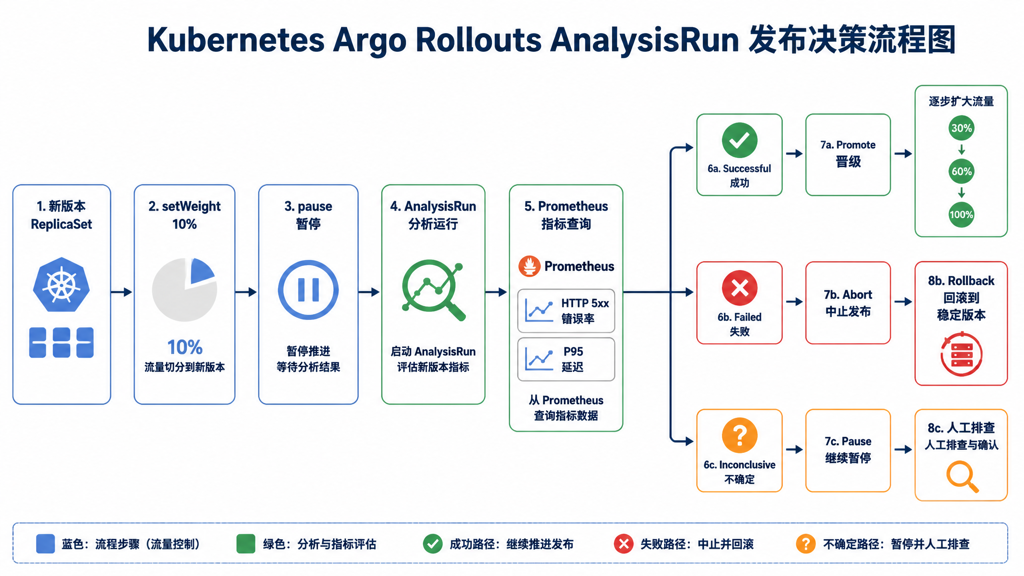
1. AnalysisTemplate 示例
下面的模板使用 Prometheus 查询金丝雀版本的 HTTP 错误率。查询标签必须能区分稳定版本和金丝雀版本,否则结果会混合两个版本,无法作为发布依据。
apiVersion: argoproj.io/v1alpha1
kind: AnalysisTemplate
metadata:
  name: payment-success-rate
  namespace: production
spec:
  args:
    - name: service-name
    - name: canary-hash
  metrics:
    - name: http-error-rate
      interval: 1m
      count: 5
      failureLimit: 1
      consecutiveErrorLimit: 3
      successCondition: result[0] < 0.02
      provider:
        prometheus:
          address: http://prometheus.monitoring.svc:9090
          query: |
            sum(rate(http_requests_total{
              service="{{args.service-name}}",
              rollout_pod_template_hash="{{args.canary-hash}}",
              status=~"5.."
            }[2m]))
            /
            sum(rate(http_requests_total{
              service="{{args.service-name}}",
              rollout_pod_template_hash="{{args.canary-hash}}"
            }[2m]))
参数和阈值设计建议:
interval不要短到只有几个请求就做决定;count与业务流量、发布窗口和指标采样周期匹配;failureLimit要结合误报成本,不能一有瞬时异常就回滚;- 查询没有数据时应明确处理,不能把空结果当成成功;
- 使用业务指标时,先确认脱敏、租户隔离和查询成本。
2. 在 Canary 步骤中调用分析
strategy:
  canary:
    canaryService: payment-canary-svc
    stableService: payment-stable-svc
    analysis:
      templates:
        - templateName: payment-success-rate
      args:
        - name: service-name
          value: payment
        - name: canary-hash
          valueFrom:
            podTemplateHashValue: Latest
    steps:
      - setWeight: 10
      - pause: {duration: 5m}
      - analysis:
      - setWeight: 30
      - pause: {duration: 15m}
      - setWeight: 60
      - pause: {duration: 30m}
分析可以配置在 Rollout 层作为发布前或发布后检查,也可以放在某个步骤中作为阶段门禁。生产上更容易解释的方式是:每次提高权重后等待数据窗口,再执行一次 AnalysisRun。
3. AnalysisRun 状态与处置
| 状态 | 含义 | 建议动作 |
|---|---|---|
Successful | 所有必要指标满足条件 | 允许进入下一步骤 |
Failed | 指标超过失败限制或查询连续失败 | 暂停/终止/回滚,并保留证据 |
Inconclusive | 数据不足或结果无法判断 | 检查流量、Prometheus、查询和采样窗口 |
Running | 仍在采样 | 不要频繁手工 promote 覆盖自动判断 |
# 查看 Rollout 关联的 AnalysisRun
kubectl get analysisrun -n production
kubectl describe analysisrun <analysisrun-name> -n production

# 查看事件和 Controller 日志
kubectl get events -n production --sort-by=.lastTimestamp
kubectl logs -n argo-rollouts deploy/argo-rollouts -n argo-rollouts --tail=300
如果指标失败,先确认查询本身能返回数据,再决定是否重试。盲目执行 retry 可能把监控故障误判为应用恢复。
4. 流量提供者选择
Istio
Istio 通过 VirtualService 权重和 DestinationRule 子集控制流量,适合已经使用服务网格的集群。需要验证入口请求真的经过 Istio,并且稳定/金丝雀 subset 标签与 Rollout 生成的 hash 一致。
NGINX Ingress
NGINX 通常使用 canary annotations 或专用 Canary Ingress 表达权重。生产中要确认 Ingress Controller 版本、注解行为和多个 Ingress 规则合并结果,避免配置存在但实际入口没有命中。
Gateway API
Gateway API 使用 HTTPRoute 等资源表达路由,适合逐步标准化入口层。使用前确认当前 Gateway Controller 是否支持 Argo Rollouts 需要的权重修改能力,不要只因为资源能创建就认为流量已切换。
5. 流量比例的验证方法
# 检查 Rollout 记录的稳定/金丝雀权重
kubectl argo rollouts get rollout payment-service -n production

# Istio 示例:检查 VirtualService 和 DestinationRule
kubectl get virtualservice payment-vs -n production -o yaml
kubectl get destinationrule payment-dr -n production -o yaml

# 通过压测或访问日志验证真实流量分布;不要只看 YAML 中的 setWeight
kubectl logs -n istio-system deploy/istio-ingressgateway --tail=200
流量统计应按足够长的窗口汇总,并区分重试请求、缓存命中、健康检查和真实业务请求。低流量服务可能永远无法在 5 分钟内得到足够样本,应调整窗口或使用离线验证。